Prep notes
What a prep note is, which meetings get one by default and why you might not, how to change the timing, and where it is delivered.
A prep note is a short brief Zime sends before an upcoming sales call. It names the main risk or status to focus on, what a good outcome from the call looks like, and the moves most likely to advance the deal. Zime builds it from the mapped deal or account, CRM fields, previous recorded calls, the attendees, and the stage criteria your company configured.
Why a Zime prep note is different
A call summary tells you what happened. A Zime prep note tells you what to do about it before you walk in: the risk on this deal, what winning the call looks like, and three moves drawn from your own sales strategy and what your best reps do.
| What you have today | A Zime prep note |
|---|---|
A call summary that tells you what was said | Names the main risk on this deal and what a good outcome from the call looks like |
Generic next steps from a general AI, such as sending the deck | Gives you three moves from your own sales strategy and your best reps' know-how |
Prep that takes hours you do not have between meetings | Arrives before the meeting by email, Slack or Microsoft Teams, at the lead time you choose |
See how it works on the prep notes page on zime.ai.
Which meetings get a prep note
Zime checks every upcoming meeting against the rules below and sends a note only when it passes all of them. These are the defaults. Your company may have different values.
| Check | Default | When it fails |
|---|---|---|
Meeting type | External meetings only. | No note for internal meetings. |
Call category | Sales calls only. | No note for calls in another category, such as vendor, support or hiring, or for calls Zime has not classified yet. |
Recorded history | The deal, account or external attendees need at least one processed recorded call. | No note for a first call or for a contact with no recorded calls. |
Timing | Zime sends the note at your lead time, 60 minutes before the meeting unless you change it. | No note when the meeting is created or changed too close to its start, has already started, or is cancelled. |
Number of invitees | No limit unless your company sets one. | No note for meetings above the limit. |
Deal mapping | A mapped deal is not required unless your company requires it. | No note when a deal is required and the meeting has none. |
Your account and setting | Prep notes are on for you when your company has them on. | No note if you turned prep notes off or your Zime account is inactive. |
To get notes for first calls, for categories other than sales, or for internal meetings, ask your Zime contact to change the setting for your company. It is not a personal setting.
Who receives it
By default the rep attending the meeting receives the note. Managers do not get their reports' prep notes, and neither do the internal attendees, unless Zime turns that on for your company. Notes are not sent to users whose accounts are inactive.
Change when you get prep notes, or turn them off
Open the settings
Go to Settings, then the Insight delivery section, and find the Prep notes card.
Pick the timing
Under Send prep note, choose 30, 60, 90, 120 or 180 minutes before the meeting starts. The default is 60.
Turn them off if you want
Switch the card off and confirm in the Turn off prep notes window, which asks why you are turning them off. Switch it back on at any time.
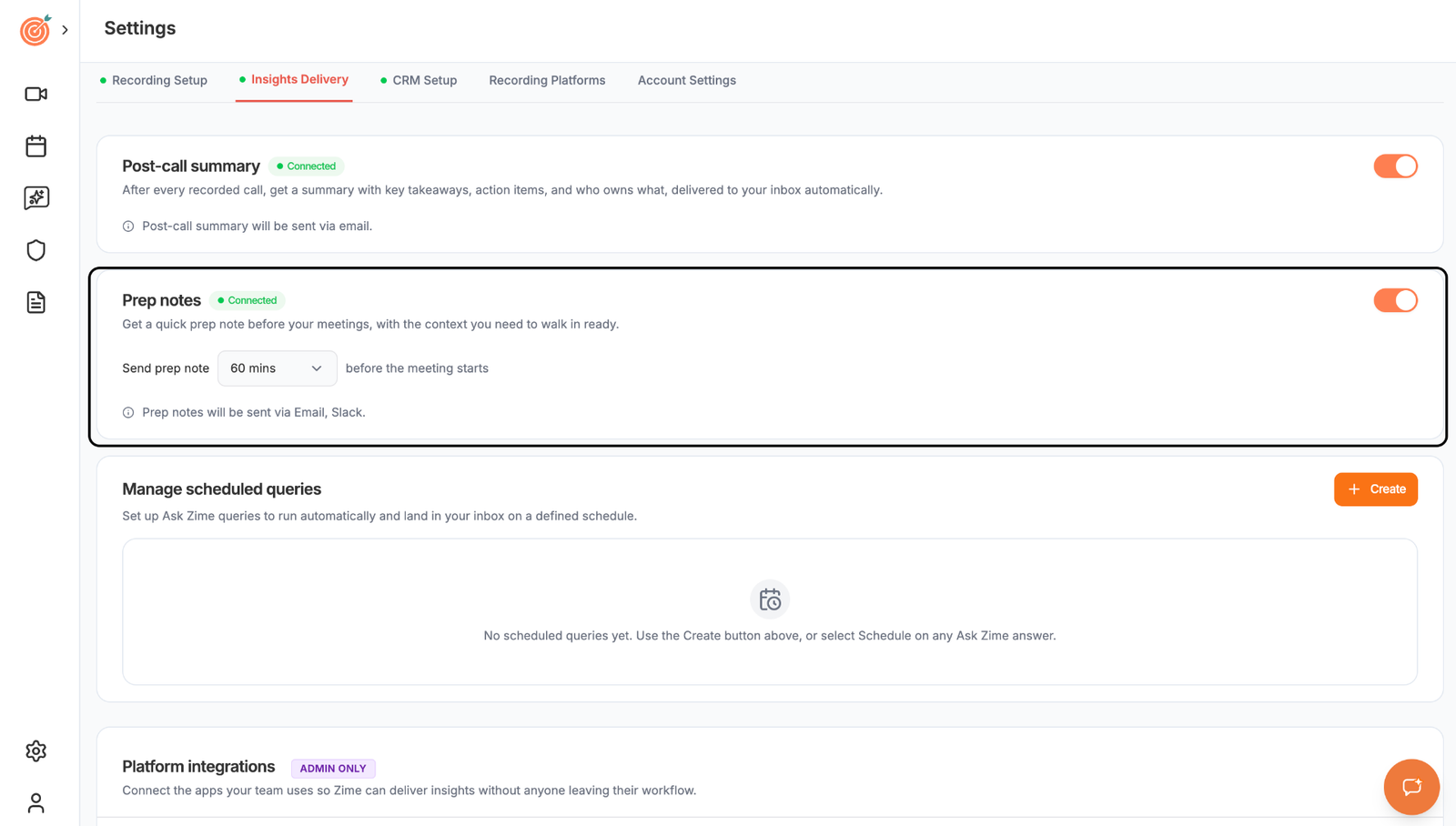
If there is no Prep notes card, your company does not have prep notes switched on. You can opt out of prep notes but not switch them on yourself.
Where it arrives
Zime delivers prep notes by email, Slack or Microsoft Teams, depending on what your company has set up. The card shows the channel in use under the timing option. Every note opens with a line that reads Prep note followed by the meeting title, and email subjects start with Prep for your upcoming call. In Slack the note arrives as a direct message from the Zime app, with an Ask me anything button. In Teams it arrives as a direct message from the Zime bot. Tables appear as plain text rows in Slack and Teams.
Prep notes need a connected calendar, because Zime builds them from your upcoming meetings. Email delivery needs nothing more. Slack and Teams delivery also need the Zime app: your company installs it in Slack, and your Teams administrator uploads it in Teams. Each person then links their account once in Slack, or signs in once in Teams.
Questions
About prep notes
5 answersWhat is a Prep Note?
A short pre-call brief for an upcoming sales call. It names the main risk or status to focus on first, what winning the call looks like, and the moves most likely to advance the deal. A note opens with the biggest risk for the call, followed by two or three suggested next steps and links back into Zime. It is meant to be read quickly, not studied.
How is a Prep Note different from a call summary?
A call summary looks back at a call that happened. A prep note looks ahead to the next call and tells you what to do on it.
What information does Zime use to generate a Prep Note?
Zime uses:
- The meeting title, time and attendees
- The mapped deal or account, its CRM fields and its stage
- Previous recorded calls with that deal, account or attendees (up to five by default)
- The stage criteria and checklists your company configured
Is a Prep Note a script?
No. It is guidance. You run the call and use the moves in your own words.
Are Prep Notes always accurate?
No. A note reflects what Zime knew when it was generated. Incomplete CRM data, a wrong deal mapping or an unrecorded call can make it miss something. If you know something newer, trust that.
Reading a prep note
6 answersWhat does "winning the call" actually mean?
The most relevant outcome for that point in the deal, which is not always closing. On an early call it may be confirming the problem and the right stakeholders. Later it may be resolving a blocker or agreeing the approval path.
How should I use "Your three moves"?
Treat them as the actions to prioritise on the call: questions to ask, concerns to address, points to confirm, next steps to secure. They are not a fixed sequence.
Why is only one risk highlighted when there could be multiple risks?
The note shows the risk Zime judges most important for this call. To look at others, use See more potential risks or ask AMA (Ask Zime).
What does Review last call do?
It opens the most relevant previous recorded call for the deal or account, so you can check what was said and what was agreed.
What does See more potential risks do?
It opens AMA with this upcoming call already loaded, so you can explore other risks, objections and stage traps without making the note longer.
What happens when I open AMA from a Prep Note?
AMA opens with the call, its deal or account and its attendees carried over, so you can ask about this call without explaining the background. For example: "What questions should I ask?", "Give me a talk track for this objection." or "How should I prepare for this attendee?"
Why you did or did not get a prep note
8 answersWhy didn't I receive a Prep Note for a call?
Check these in turn:
- The meeting is internal.
- The call is not in the Sales category, or Zime has not classified it yet.
- It is a first call, or the deal, account and attendees have no processed recorded calls.
- The meeting was created or changed too close to its start, has started, or was cancelled.
- It has more invitees than your company's limit, or no deal when your company requires one.
- Your calendar is not connected in Zime.
- Prep notes are off for you, or the delivery channel is not connected.
Why do I receive Prep Notes for some calls but not others?
Zime checks each meeting on its own against the rules in the table above, so two calls on the same day can get different results.
How does Prep Note work for a first call?
By default Zime does not send a prep note for a first call, because there is no recorded history to build it from. Your company can ask Zime to change this. Calls then get a note built from the attendees and the CRM and account context, which is usually lighter than one built on earlier calls.
What happens when there are no previous recorded calls?
By default there is no note. Zime looks for a processed recorded call with the deal, the account or the external attendees. Once you record a call with them, later meetings qualify.
Why doesn't my Prep Note mention a deal?
The meeting is not mapped to a deal. Zime then builds the note from the attendees and what it knows about them, which is broader. Mapping the meeting to the right deal makes future notes more specific. If your company requires a deal, an unmapped meeting gets no note.
Why are some Prep Notes more detailed than others?
A note is richer when the meeting is mapped to the right deal, earlier calls are recorded and CRM fields are filled in. With less context the note is shorter and more general.
How can I improve future Prep Notes?
- Record your external calls.
- Keep CRM fields current.
- Map meetings to the correct deal.
- Keep your delivery channels connected.
What should I do if something in my Prep Note looks incorrect?
Check the deal mapping, the CRM record and the recorded calls the note drew on. Outdated CRM data, a wrong mapping or an unrecorded conversation are the usual causes. If it keeps happening, report it to support@zime.ai.
Delivery and settings
9 answersWhen will I receive a Prep Note?
By default 60 minutes before the meeting starts. You can choose 30, 60, 90, 120 or 180 minutes in Settings, Insight delivery, Prep notes.
Can I change when Prep Notes are delivered?
Yes. Use the Send prep note option on the Prep notes card in Settings, Insight delivery.
Can I turn Prep Notes off?
Yes. Switch off the Prep notes card in Settings, Insight delivery, and confirm. You can switch it back on later.
Where can I receive Prep Notes?
By email, Slack or Microsoft Teams, depending on your company's setup. The Prep notes card shows which channel Zime uses for you.
Why did I receive a Prep Note on one channel but not another?
Each channel needs its own connection. A channel that is disconnected or not set up for you does not receive the note even when another one does.
What happens if a meeting is created or updated shortly before it starts?
The note may be skipped, because Zime needs time to build and send it before your lead time. If a meeting moves to a later time, Zime reschedules the note for the new start.
Why is there no Prep notes card in my settings?
Your company does not have prep notes switched on. You can opt out of prep notes but cannot switch them on yourself. Ask your Zime contact.
Can I reply to the Zime Teams bot?
Yes. Your 1:1 chat with Zime in Teams is also where you can ask Zime questions about your deals, accounts and calls. The first time, Zime asks you to sign in once. See Zime in MS Teams for all the ways to ask.
I messaged the bot and it did not respond. Is that expected?
No. Zime replies to every message in your 1:1 chat. If it asked you to sign in, click the link in that message first. If it says it can’t find your Zime account, the email on your Teams profile doesn’t match a Zime user; ask your Zime admin to fix it. If you see ‘Something went wrong’ with a reference code, try again, and send the code to support@zime.ai if it keeps happening.
Still need help?
Write to support@zime.ai and the team will get back to you.